Return rows from one table not in another table

There are at least 5 ways to return data from one table which is not in another table. Two of these are SQL Server 2005 and greater only

NOT IN

NOT EXISTS

LEFT and RIGHT JOIN

OUTER APPLY (2005+)

EXCEPT (2005+)

First create these two tables
tsqlLine number Off | Hide | Select all

CREATE TABLE testnulls (ID INT)
INSERT INTO testnulls VALUES (1)
INSERT INTO testnulls VALUES (2)
INSERT INTO testnulls VALUES (null)

CREATE TABLE testjoin (ID INT)
INSERT INTO testjoin VALUES (1)
INSERT INTO testjoin VALUES (3)

Contents
[hide]

1 NOT IN
2 NOT EXISTS
3 LEFT and RIGHT JOIN
4 OUTER APPLY (SQL 2005 +)
5 EXCEPT(SQL 2005 +)

NOT IN

Run the following Code
tsqlLine number Off | Hide | Select all

SELECT * FROM testjoin WHERE ID NOT IN(SELECT ID FROM testnulls)

What happened? Nothing gets returned! The reason is because the subquery returns a NULL and you can’t compare a NULL to anything

Now run this
tsqlLine number Off | Hide | Select all

SELECT * FROM testjoin WHERE ID NOT IN(SELECT ID FROM testnulls WHERE ID IS NOT NULL)

That worked because we eliminated the NULL values in the subquery

NOT EXISTS

NOT EXISTS doesn’t have the problem that NOT IN has. Run the following code
tsqlLine number Off | Hide | Select all

SELECT *
FROM testjoin j
WHERE NOT EXISTS (
SELECT 1
FROM testnulls n
WHERE n.ID = j.ID
)

Everything worked as expected
LEFT and RIGHT JOIN

Plain vanilla LEFT and RIGHT JOINS
tsqlLine number Off | Hide | Select all

SELECT j.*
FROM
testjoin j
LEFT JOIN testnulls n ON n.ID = j.ID
WHERE n.ID IS NULL

SELECT j.*
FROM testnulls n
RIGHT OUTER JOIN testjoin j ON n.ID = j.ID
WHERE n.ID IS NULL

OUTER APPLY (SQL 2005 +)

OUTER APPLY is something that got added to SQL 2005
tsqlLine number Off | Hide | Select all

SELECT j.*
FROM testjoin j
OUTER APPLY (
SELECT id
FROM testnulls n
WHERE n.ID = j.ID
) a
WHERE a.ID IS NULL

EXCEPT(SQL 2005 +)

EXCEPT was added in SQL 2005. It returns everything from the top table which is not in the bottom table.
tsqlLine number Off | Hide | Select all

SELECT * FROM testjoin
EXCEPT
SELECT * FROM testnulls

INTERSECT returns whatever is in both tables (like a regular join).
tsqlLine number Off | Hide | Select all

SELECT * FROM testjoin
INTERSECT
SELECT * FROM testnulls

There seems to be a higher cost associated with the EXCEPT and INTERSECT queries vs. the IN or EXISTS approach due to a sort.

In the case of this test:
tsqlLine number Off | Hide | Select all

DECLARE @TABLE1 TABLE (id int IDENTITY(1,1), name varchar(10))
DECLARE @TABLE2 TABLE (id int IDENTITY(1,1), name varchar(10))

INSERT @TABLE1 VALUES (‘DAVE’)
INSERT @TABLE1 VALUES (‘MARK’)

INSERT @TABLE2 VALUES (‘DAVE’)
INSERT @TABLE2 VALUES (NULL)

SELECT * FROM @TABLE1 t1 WHERE NOT EXISTS (SELECT 1 FROM @TABLE2 t2 WHERE t1.NAME = t2.NAME)

SELECT * FROM @TABLE1
EXCEPT
SELECT * FROM @TABLE2

The plan produced shows the higher cost:

File:Sqlplan.png

Is this a fair assumption to make or are there other factors to take into consideration (such as number of records, indexes etc)?

This is also the same reason that UNION ALL is much faster than UNION

Take this for example
tsqlLine number Off | Hide | Select all

CREATE TABLE #TABLE1 (id int IDENTITY(1,1), name varchar(10))
CREATE TABLE #TABLE2 (id int IDENTITY(1,1), name varchar(10))

INSERT #TABLE1 VALUES (‘DAVE’)
INSERT #TABLE1 VALUES (‘MARK’)

INSERT #TABLE2 VALUES (‘DAVE’)
INSERT #TABLE2 VALUES (NULL)

Now run this and check the plan
tsqlLine number Off | Hide | Select all

SELECT * FROM #TABLE1
UNION
SELECT * FROM #TABLE2

SELECT * FROM #TABLE1
UNION ALL
SELECT * FROM #TABLE2

Execution plans (in text)

UNION
tsqlLine number Off | Hide | Select all

|–Sort(DISTINCT ORDER BY:([Union1004] ASC, [Union1005] ASC))
|–Concatenation
|–Table Scan(OBJECT:([tempdb].[dbo].[#TABLE1000000005630]))
|–Table Scan(OBJECT:([tempdb].[dbo].[#TABLE2000000005630]))

UNION ALL
tsqlLine number Off | Hide | Select all

|–Concatenation
|–Table Scan(OBJECT:([tempdb].[dbo].[#TABLE1000000005630]))
|–Table Scan(OBJECT:([tempdb].[dbo].[#TABLE2000000005630]))

Take a look at SSIS way of solving this problem at SSIS: Checking if a row exists and if it does, has it changed?

Source: http://wiki.lessthandot.com/index.php/5_ways_to_return_rows_from_one_table_not_in_another_table

[CodeIgniter] jQuery autocomplete dengan remote json

Untuk postingan yang ini saya tidak mau terlalu banyak basa basi, sebab mungkin diantara pembaca pada malas untuk melihat dan mencermati renungan saya. Ya sebab saya sendiri jika lihat postingan orang lain yang terlalu basa basi jadi males sendiri 😀 ok deh langsung saja

buat database seperti berikut

CREATE TABLE IF NOT EXISTS `tbl_bahasa` (
  `id` int(5) NOT NULL AUTO_INCREMENT,
  `bahasa` varchar(200) NOT NULL,
  PRIMARY KEY (`id`)
) 
INSERT INTO `tbl_bahasa` (`id`, `bahasa`) VALUES
(1, 'ActionScript'),
(2, 'AppleScript'),
(3, 'Asp'),
(4, 'BASIC'),
(5, 'C'),
(6, 'C++'),
(7, 'Clojure'),
(8, 'COBOL'),
(9, 'ColdFusion'),
(10, 'Erlang'),
(11, 'Fortran'),
(12, 'Groovy'),
(13, 'Haskell'),
(14, 'Java'),
(15, 'JavaScipt'),
(16, 'Lisp'),
(17, 'Perl'),
(18, 'PHP'),
(19, 'Python'),
(20, 'Ruby'),
(21, 'Scala'),
(22, 'Scheme');

kemudian buka database.php, atur sesuai dengan nama database yang anda buat.
Karena ini hanya contoh, jadi tidak perlu repot-repot membuat controller baru, jadi pake saja welcome.php

<?php if ( ! defined('BASEPATH')) exit('No direct script access allowed');

class Welcome extends CI_Controller {    

    public function __construct()
    {
        parent::__construct();
        $this->load->model('autocomplete_model');
        $this->load->database();
        $this->load->helper('url');
    }
    public function index()
    {
        $this->load->view('welcome_message');
    }
    public function suggestions()
    {
        $bahasa = $this->input->post('bahasa',TRUE);
        $rows = $this->autocomplete_model->getData($bahasa);
        $json_array = array();
        foreach ($rows as $row)
            $json_array[]=$row->bahasa;
        echo json_encode($json_array);
    }
}
/* End of file welcome.php */
/* Location: ./application/controllers/welcome.php */

buat juga model dengan nama autocomplete_model.php

<?php

class Autocomplete_Model extends CI_Model
{
    public function __construct()
    {
        parent::__construct();
    }
    public function getData($bahasa)
    {
        $this->db->select('bahasa');
        $this->db->like('bahasa', $bahasa);
           $query = $this->db->get('tbl_bahasa');
        return $query->result();
    }

}

buka view welcome_message.php kemudian tambahkan

<link href="http://ajax.googleapis.com/ajax/libs/jqueryui/1.8/themes/base/jquery-ui.css" rel="stylesheet" type="text/css"/>
    <script type="text/javascript" src="http://ajax.googleapis.com/ajax/libs/jquery/1.4/jquery.min.js"></script>
    <script type="text/javascript" src="http://ajax.googleapis.com/ajax/libs/jqueryui/1.8/jquery-ui.min.js"></script>
    <script type="text/javascript">
    // <![CDATA[
    $(document).ready(function () {
        $(function () {
            $( "#autocomplete" ).autocomplete({
                source: function(request, response) {
                    $.ajax({ 
                        url: "<?php echo site_url('welcome/suggestions'); ?>",
                        data: { bahasa: $("#autocomplete").val()},
                        dataType: "json",
                        type: "POST",
                        success: function(data){
                            response(data);
                        }    
                    });
                },
            });
        });
    });
    // ]]>
    </script>
</head>
<body>
<div id="container">
    <h1>jQurey AutoComplete with remote json</h1>
    <div id="body">
        Text: <input type="text" id="autocomplete" />
    </div>
    <p class="footer">Page rendered in <strong>{elapsed_time}</strong> seconds</p>
</div>
</body>
</html>

Source: http://blog.didanurwanda.com/2013/02/codeigniter-jquery-autocomplete-dengan_26.html

Trigger MySQL Mengurangi/Menambah Stok

Pertama-tama kita buat dulu database sederhana kita beri nama : Inventory, atau terserah apalah bagi yang belum bisa buat databasae coba simak altikel berikut.

Selanjutnya kita buat tabel-tabelnya yaitu barang, jual, dan beli

1
2
3
4
5
6
7
8
9
10
11
12
13
14
15
16
17
18
19
20
21
22
23
CREATE TABLE IF NOT EXISTS `barang` (
 `kodebrg` varchar(15) NOT NULL,
 `nama` varchar(15) NOT NULL,
 `satauan` varchar(5) NOT NULL,
 `stok` int(11) NOT NULL,
 PRIMARY KEY (`kodebrg`)
) ENGINE=InnoDB DEFAULT CHARSET=latin1;
CREATE TABLE IF NOT EXISTS `beli` (
 `nofaktur` varchar(15) NOT NULL,
 `tgl` date NOT NULL,
 `kodebrg` varchar(15) NOT NULL,
 `qty` int(11) NOT NULL,
 PRIMARY KEY (`nofaktur`)
) ENGINE=InnoDB DEFAULT CHARSET=latin1;
CREATE TABLE IF NOT EXISTS `jual` (
 `nofaktur` varchar(15) NOT NULL,
 `tgl` date NOT NULL,
 `kodebrg` varchar(15) NOT NULL,
 `qty` int(11) NOT NULL,
 PRIMARY KEY (`nofaktur`)
) ENGINE=InnoDB DEFAULT CHARSET=latin1;

Perhatikan struktur tabel agar trigger bisa di eksekusi!! pakek analogi sederhana kita akan mengurangi stok dari tabel barang kita lock PK(Primary Key)-nya dalam kasus ini kodebrg ini kita jadikan senjata ditabel lain untuk memicu trigger nantinya, atau bahasa mudahnya tabel yang akan dipasang trigger harus memiliki field tabel yang akan di kenakan trigger.

Jika sudah jadi masukan beberapa data barang lewat menu Insert, saya coba seperti tampak pada gambar dibawah ini

mysqltrigger-01

Selanjutnya coba kita pasang Trigger di tabel jual, kita gunakan fasilitas yang sudah ada saja perhatikan gambar

mysqltrigger-02

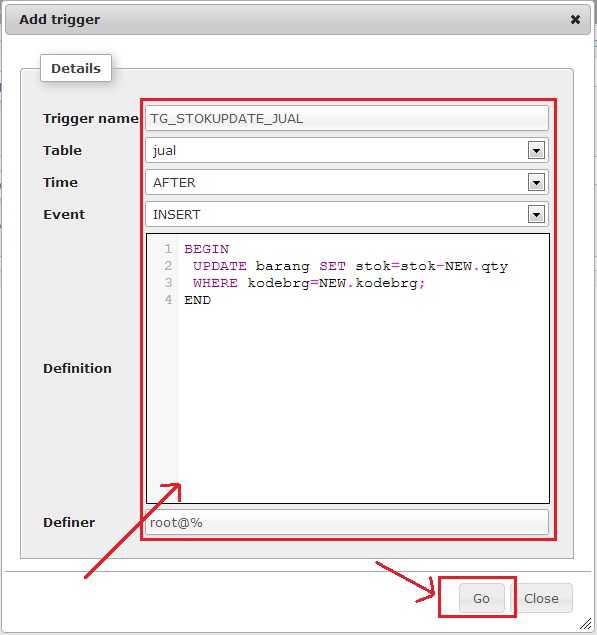
Maka akan tampak tampilan jendela trigger seperti gambar dibawah :

mysqltrigger-03

Penjelasanya :

– Trigger name : nama trigger (terserah isikan nama apa saja cuman buat mempermudah saat edit dsb).
– Table : dimana Trigger tersebut aktif
– Time serta Event : sudah dijelaskan diatas yaitu waktu dimana trigger dieksekusi
(jika diterjemahkan maka trigger dengan nama : TG_STOKUPDATE_JUAL akan aktif setelah tabel jual melakukan insert record)
– Definition : adalah isi trigger yang kita buat, penjelasan

1
2
3
4
5
6
7
BEGIN
 UPDATE barang SET stok=stok-NEW.qty
 //mengupdate tabel barang filed stok, dimana stok=stok (dikurangi)
 //NEW.qty maksutnya field qty dari record baru yang di insert ditabel jual
 WHERE kodebrg=NEW.kodebrg;
 //dimana kodebrg nya adalah field kodebrg dari record baru yang diinsert ditabel jual
END

– Definer : yang menggunakan trigger, root@% (maksutnya user root di semua ip) bisa juga root@localhost, atau ip yg diperbolehkan saja root@192.168.1.1 misalnya.

Setelah itu lakukan cara yang sama tambahkan trigger pada tabel beli tidak perlu takut salah karena bisa diedit juga, karena logikanya jika kita beli maka nambah stok maka cukup sedikit dirubah pada tanda matematisnya menjadi  :
UPDATE barang SET stok=stok+NEW.qty

Oke sekarang coba lakukan insert di tabel jual maupun beli lewat mysql saja, perhatikan baik2 stoknya jangan salah menuliskan kode barang karena klo salah trigger tidak jalan, lihat gambar :

mysqltrigger-04
Maksutnya kita akan menjual barang dengan kodebrg BR001 sejumlah 3, nah setelah di eksekusi coba buka tabel barang yang tadinya barang dengan kode BR001 (Rinso) stok: 10, sekarang berkurang menjadi 7. lakukan test juga pada tabel beli maka stok akan otomatis bertambah…

Selamat mencoba dan semoga menambah manfaat 🙂

Sumber artikel: https://mboloz.wordpress.com/2013/02/22/trigger-mysql-mengurangi-stok/

PHP: Directory Listing

1. Single Directory Listing

To get started, here is a simple function that returns a list of files, directories and their properties from a single directory (more advanced versions of this function can be found further down the page):

<?PHP function getFileList($dir) { // array to hold return value $retval = array(); // add trailing slash if missing if(substr($dir, -1) != "/") $dir .= "/"; // open pointer to directory and read list of files $d = @dir($dir) or die("getFileList: Failed opening directory $dir for reading"); while(false !== ($entry = $d->read())) { // skip hidden files if($entry[0] == ".") continue; if(is_dir("$dir$entry")) { $retval[] = array( "name" => "$dir$entry/", "type" => filetype("$dir$entry"), "size" => 0, "lastmod" => filemtime("$dir$entry") ); } elseif(is_readable("$dir$entry")) { $retval[] = array( "name" => "$dir$entry", "type" => mime_content_type("$dir$entry"), "size" => filesize("$dir$entry"), "lastmod" => filemtime("$dir$entry") ); } } $d->close(); return $retval; } ?>

You can use this function as follows:

<?PHP // list files in the current directory $dirlist = getFileList("."); $dirlist = getFileList("./"); // a subdirectory of the current directory called images $dirlist = getFileList("images"); $dirlist = getFileList("images/"); $dirlist = getFileList("./images"); $dirlist = getFileList("./images/"); // using an absolute path $dirlist = getFileList("{$_SERVER['DOCUMENT_ROOT']}/images"); $dirlist = getFileList("{$_SERVER['DOCUMENT_ROOT']}/images/"); ?>

The variable $_SERVER['DOCUMENT_ROOT'] should resolve to the root directory of your website. e.g. /var/www/public_html

The return value is an associative array of files including the filepath, type, size and last modified date, except when a file is actually a directory, in that case the string “(dir)” appears instead of the filesize. The filenames take the same stem as the function call:

Example 1:

<?PHP $dirlist = getFileList("images"); echo "<pre>",print_r($dirlist),"</pre>"; /* sample output Array ( [0] => Array ( [name] => images/background0.jpg [type] => image/jpeg [size] => 86920 [lastmod] => 1077461701 ) [1] => ... ) */ ?>

Example 2:

<?PHP $dirlist = getFileList("./images"); echo "<pre>",print_r($dirlist),"</pre>"; /* sample output Array ( [0] => Array ( [name] => ./images/background0.jpg [type] => image/jpeg [size] => 86920 [lastmod] => 1077461701 ) [1] => ... ) */ ?>

If you want the output sorted by one or more fields, you should read the article on Sorting Arrays of Arrays or try out one of our DHTML Sorting Algorithms using JavaScript.

We also have an article on Directory Listing using SPL classes (DirectoryIterator and SplFileInfo) which introduces many new options for filtering and sorting the output.

2. Displaying File List in HTML

To output the results to an HTML page we just loop through the returned array:

<?PHP // output file list in HTML TABLE format echo "<table border=\"1\">\n"; echo "<thead>\n"; echo "<tr><th>Name</th><th>Type</th><th>Size</th><th>Last Modified</th></tr>\n"; echo "</thead>\n"; echo "<tbody>\n"; foreach($dirlist as $file) { echo "<tr>\n"; echo "<td>{$file['name']}</td>\n"; echo "<td>{$file['type']}</td>\n"; echo "<td>{$file['size']}</td>\n"; echo "<td>",date('r', $file['lastmod']),"</td>\n"; echo "</tr>\n"; } echo "</tbody>\n"; echo "</table>\n\n"; ?>

This code can be easily modified to: make the output a list instead of a table; make the file names actual links; replace the names with icons based on file type or extension; etc.

Display PNG images in a TABLE:

For example, to display only PNG files, just add a condition to the output loop:

<?PHP // output file list as HTML table echo "<table border=\"1\">\n"; echo "<thead>\n"; echo "<tr><th></th><th>Name</th><th>Type</th><th>Size</th><th>Last Modified</th></tr>\n"; echo "</thead>\n"; echo "<tbody>\n"; foreach($dirlist as $file) { if(!preg_match("/\.png$/", $file['name'])) continue; echo "<tr>\n"; echo "<td><img src=\"{$file['name']}\" width=\"64\"></td>\n"; echo "<td>{$file['name']}</td>\n"; echo "<td>{$file['type']}</td>\n"; echo "<td>{$file['size']}</td>\n"; echo "<td>",date('r', $file['lastmod']),"</td>\n"; echo "</tr>\n"; } echo "</tbody>\n"; echo "</table>\n\n"; ?>

Here you can view the complete source code for this example.

This will have the effect of skipping all files whose name does not end with .png. You could also apply conditions based on the file type, size, or last modified timestamp.

List PDF files with links:

One last example, listing only PDF files and having the file name link to the file:

<table border="1"> <thead> <tr><th>Name</th><th>Type</th><th>Size</th><th>Last Modified</th></tr> </thead> <tbody> <?PHP // output file list as table rows foreach($dirlist as $file) { if($file['type'] != 'application/pdf') continue; echo "<tr>\n"; echo "<td><a href=\"{$file['name']}\">",basename($file['name']),"</a></td>\n"; echo "<td>{$file['type']}</td>\n"; echo "<td>{$file['size']}</td>\n"; echo "<td>",date('r', $file['lastmod']),"</td>\n"; echo "</tr>\n"; } ?> </tbody> </table>

Here you can view the complete source code for this example.

If you want to display, for example, a thumbnail as a link to a larger image, or even a video, just give the two files the same name and in the script above use str_replace or similar function to modify either the link href or the link contents. See our article on listing images for examples.

Using the SPL DirectoryIterator and FilterIterator classes we can now specify a pattern to match when accessing the file list so only matching files are returned. More on that here.

3. Recursive Directory Listing

Now that we’ve got this far, it’s only a minor change to extend the function in order to recursively list any subdirectories. By adding a second parameter to the function we also retain the previous functionality of listing a single directory.

<?PHP // Original PHP code by Chirp Internet: www.chirp.com.au // Please acknowledge use of this code by including this header. function getFileList($dir, $recurse=false) { $retval = array(); // add trailing slash if missing if(substr($dir, -1) != "/") $dir .= "/"; // open pointer to directory and read list of files $d = @dir($dir) or die("getFileList: Failed opening directory $dir for reading"); while(false !== ($entry = $d->read())) { // skip hidden files if($entry[0] == ".") continue; if(is_dir("$dir$entry")) { $retval[] = array( "name" => "$dir$entry/", "type" => filetype("$dir$entry"), "size" => 0, "lastmod" => filemtime("$dir$entry") ); if($recurse && is_readable("$dir$entry/")) { $retval = array_merge($retval, getFileList("$dir$entry/", true)); } } elseif(is_readable("$dir$entry")) { $retval[] = array( "name" => "$dir$entry", "type" => mime_content_type("$dir$entry"), "size" => filesize("$dir$entry"), "lastmod" => filemtime("$dir$entry") ); } } $d->close(); return $retval; } ?>

To make use of the new functionality, you need to pass a value of true (or 1) as the second parameter.

<?PHP // single directory $dirlist = getFileList("./"); // include subdirectories $dirlist = getFileList("./", true); ?>

Before recursing the script first checks whether sub-directories are readable, and otherwise moves on to the next item so as to avoid permission errors.

As before, the return value is an array of associative arrays. In fact the only change is that you have the additional option of a recursive listing.

4. Limited Depth Recursion

This final example adds another feature – the ability to specify how deep you want the recursion to go. The previous code would continue to explore directories until it ran out of places to go. With this script you can tell it to not go deeper than a fixed number of levels in the file system.

<?PHP // Original PHP code by Chirp Internet: www.chirp.com.au // Please acknowledge use of this code by including this header. function getFileList($dir, $recurse=false, $depth=false) { $retval = array(); // add trailing slash if missing if(substr($dir, -1) != "/") $dir .= "/"; // open pointer to directory and read list of files $d = @dir($dir) or die("getFileList: Failed opening directory $dir for reading"); while(false !== ($entry = $d->read())) { // skip hidden files if($entry[0] == ".") continue; if(is_dir("$dir$entry")) { $retval[] = array( "name" => "$dir$entry/", "type" => filetype("$dir$entry"), "size" => 0, "lastmod" => filemtime("$dir$entry") ); if($recurse && is_readable("$dir$entry/")) { if($depth === false) { $retval = array_merge($retval, getFileList("$dir$entry/", true)); } elseif($depth > 0) { $retval = array_merge($retval, getFileList("$dir$entry/", true, $depth-1)); } } } elseif(is_readable("$dir$entry")) { $retval[] = array( "name" => "$dir$entry", "type" => mime_content_type("$dir$entry"), "size" => filesize("$dir$entry"), "lastmod" => filemtime("$dir$entry") ); } } $d->close(); return $retval; } ?>

As before we’ve added a single new parameter and a few lines of code. The default value of the depth parameter, if not defined in the function call, is set to false. This ensures that all previous features remain and that any legacy code won’t break when the function is changed.

In other words, we can now call the getFileList function with one, two or three parameters:

<?PHP // single directory $dirlist = getFileList("./"); // include all subdirectories recursively $dirlist = getFileList("./", true); // include just one or two levels of subdirectories $dirlist = getFileList("./", true, 1); $dirlist = getFileList("./", true, 2); ?>

This is a good example of how a function can evolve over time without becoming unmanageable. Too often you see functions that were once useful become unusable because of parameter bloat.


Go to next/previous record mysql

Here is an example:

<?php
$con = mysqli_connect(“localhost”,”root”,””,”vehicle”);
// Check connection
if (mysqli_connect_errno())
{
echo “Failed to connect to MySQL: ” . mysqli_connect_error();
}

if (isset($_POST[‘id’])) {
$tmp = array_keys($_POST[‘id’]);
$curid = intval($tmp[0]);

// Select contents from the selected id
$sql = “SELECT * FROM cars WHERE id={$curid}”;
$result = mysqli_query($con,$sql);
if (mysqli_num_rows($result)>0) {
$info = mysqli_fetch_assoc($result);
} else {
die(‘Not found’);
}

// Next id
$sql = “SELECT id FROM cars WHERE id>{$curid} LIMIT 1”;
$result = mysqli_query($con,$sql);
if (mysqli_num_rows($result)>0) {
while($row = mysqli_fetch_assoc($result)) {
$nextid = $row[‘id’];
}
}

// Prev id
$sql = “SELECT id FROM cars WHERE id<{$curid} LIMIT 1″;
$result = mysqli_query($con,$sql);
if (mysqli_num_rows($result)>0) {
while($row = mysqli_fetch_assoc($result)) {
$previd = $row[‘id’];
}
}
} else {
// No form has been submitted so use the lowest id and grab its info
$sql = ” SELECT * FROM cars WHERE id > 0 LIMIT 1″;
$result = mysqli_query($con,$sql);
if (mysqli_num_rows($result)>0) {
$info = mysqli_fetch_assoc($result);
}
}

if (isset($info)) {
$content = ‘<pre>’.print_r($info,true).'</pre>’;
} else {
$content =  ‘Nothing in the db :(‘;
}
?>
<html>
<head>
<title>Next prev</title>
</head>
<body>
<h3>Info</h3>
<?php echo $content; ?>
<form method=”post”>
<?php if (isset($previd)) { ?>
<input type=”submit” name=”id[<?php echo $previd?>]” value=”prev”>
<?php } ?>
<?php if (isset($nextid)) { ?>
<input type=”submit” name=”id[<?php echo $nextid?>]” value=”next”>
<?php } ?>
</form>
</body>
</html>

Source: http://board.phpbuilder.com/showthread.php?10352339-go-to-next-record-mysql