Split nilai pada JavaScript

Berikut salah satu contoh penggunaan split untuk memisahkan sebuah nilai string ke dalam sebuah variabele array. Setelah itu, nilai dimasukkan kedalam input form berdasarkan id-nya.


function fill(Value)
{
var splits = Value.split(‘-‘);
$(‘#nomor’).val(splits[0]);
$(‘#nama_pasien’).val(splits[1]);

}
 

Joomla 3.x. How to change browser page title

Joomla 3.x. How to change

Joomla 3.x. How to change browser page title

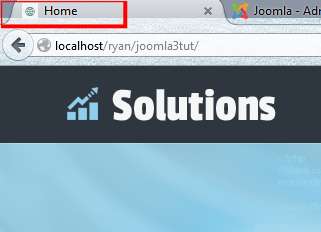
  1. You can see the browser page title on the screenshot below.
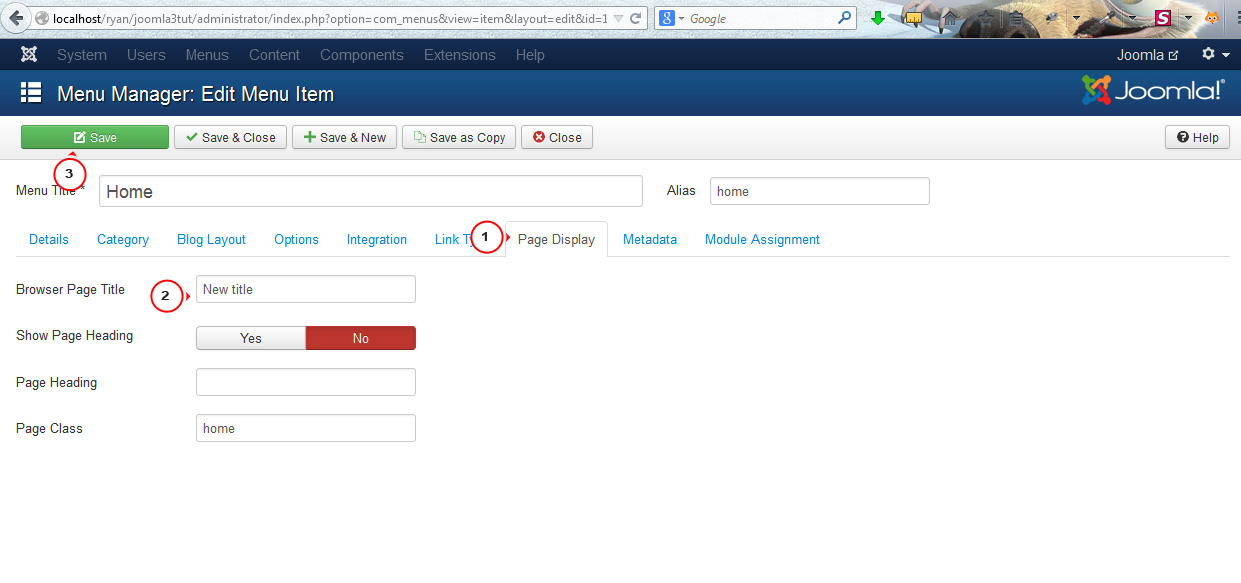
  2. We are going to change the browser page title for the Home menu item. Please go to Menu Manager and open the appropriate menu item. Open the Page Display section. Specify Browser page title. Save changes. You can do the same for all menu items.Joomla 3.x. How to change browser page title-2
  3. Refresh the page. We have changed the browser page title.
  4. You can include Joomla site name to page title. Open the Global Configuration -> Site tab. Set Site name. Specify the appropriate value for the Include Site Name in Page Titles field. You can set it below or after the page title. Save changes.Joomla 3.x. How to change browser page title-4
  5. Refresh the page. Joomla site name shows up in the browser page title.

Source: http://www.templatemonster.com/help/joomla-how-to-change-browser-page-title.html

Add and Remove ListBox Items in JavaScript

Step 1: For this, we will first use some controls like TextBox (txtValue) to add the value in the ListBox, ListBox (lstValue) and an Add and Delete Button as in the following:

<input name=”txtValue” type=”text” />

<input type=”button” name=”add” value=”Add” onclick=”addValue();” />

<select name=”lstValue” multiple>

<option value=”empty”></select>

<input type=”button” name=”delete” value=”Delete” onclick=”deleteValue();” />
Step 2: Now we will write the code for adding the items in the ListBox like this:
<script language=”javascript” type=”text/javascript”>

var i = 0;

function addValue() {

var v = document.form1.txtValue.value;

// get the TextBox Value and assign it into the variable

AddOpt = new Option(v, v);

document.form1.lstValue.options[i++] = AddOpt;

return true;

}

</script>


Source: http://www.c-sharpcorner.com/UploadFile/mahakgupta/add-and-remove-listbox-items-in-javascript/

Return rows from one table not in another table

There are at least 5 ways to return data from one table which is not in another table. Two of these are SQL Server 2005 and greater only

NOT IN

NOT EXISTS

LEFT and RIGHT JOIN

OUTER APPLY (2005+)

EXCEPT (2005+)

First create these two tables
tsqlLine number Off | Hide | Select all

CREATE TABLE testnulls (ID INT)
INSERT INTO testnulls VALUES (1)
INSERT INTO testnulls VALUES (2)
INSERT INTO testnulls VALUES (null)

CREATE TABLE testjoin (ID INT)
INSERT INTO testjoin VALUES (1)
INSERT INTO testjoin VALUES (3)

Contents
[hide]

1 NOT IN
2 NOT EXISTS
3 LEFT and RIGHT JOIN
4 OUTER APPLY (SQL 2005 +)
5 EXCEPT(SQL 2005 +)

NOT IN

Run the following Code
tsqlLine number Off | Hide | Select all

SELECT * FROM testjoin WHERE ID NOT IN(SELECT ID FROM testnulls)

What happened? Nothing gets returned! The reason is because the subquery returns a NULL and you can’t compare a NULL to anything

Now run this
tsqlLine number Off | Hide | Select all

SELECT * FROM testjoin WHERE ID NOT IN(SELECT ID FROM testnulls WHERE ID IS NOT NULL)

That worked because we eliminated the NULL values in the subquery

NOT EXISTS

NOT EXISTS doesn’t have the problem that NOT IN has. Run the following code
tsqlLine number Off | Hide | Select all

SELECT *
FROM testjoin j
WHERE NOT EXISTS (
SELECT 1
FROM testnulls n
WHERE n.ID = j.ID
)

Everything worked as expected
LEFT and RIGHT JOIN

Plain vanilla LEFT and RIGHT JOINS
tsqlLine number Off | Hide | Select all

SELECT j.*
FROM
testjoin j
LEFT JOIN testnulls n ON n.ID = j.ID
WHERE n.ID IS NULL

SELECT j.*
FROM testnulls n
RIGHT OUTER JOIN testjoin j ON n.ID = j.ID
WHERE n.ID IS NULL

OUTER APPLY (SQL 2005 +)

OUTER APPLY is something that got added to SQL 2005
tsqlLine number Off | Hide | Select all

SELECT j.*
FROM testjoin j
OUTER APPLY (
SELECT id
FROM testnulls n
WHERE n.ID = j.ID
) a
WHERE a.ID IS NULL

EXCEPT(SQL 2005 +)

EXCEPT was added in SQL 2005. It returns everything from the top table which is not in the bottom table.
tsqlLine number Off | Hide | Select all

SELECT * FROM testjoin
EXCEPT
SELECT * FROM testnulls

INTERSECT returns whatever is in both tables (like a regular join).
tsqlLine number Off | Hide | Select all

SELECT * FROM testjoin
INTERSECT
SELECT * FROM testnulls

There seems to be a higher cost associated with the EXCEPT and INTERSECT queries vs. the IN or EXISTS approach due to a sort.

In the case of this test:
tsqlLine number Off | Hide | Select all

DECLARE @TABLE1 TABLE (id int IDENTITY(1,1), name varchar(10))
DECLARE @TABLE2 TABLE (id int IDENTITY(1,1), name varchar(10))

INSERT @TABLE1 VALUES (‘DAVE’)
INSERT @TABLE1 VALUES (‘MARK’)

INSERT @TABLE2 VALUES (‘DAVE’)
INSERT @TABLE2 VALUES (NULL)

SELECT * FROM @TABLE1 t1 WHERE NOT EXISTS (SELECT 1 FROM @TABLE2 t2 WHERE t1.NAME = t2.NAME)

SELECT * FROM @TABLE1
EXCEPT
SELECT * FROM @TABLE2

The plan produced shows the higher cost:

File:Sqlplan.png

Is this a fair assumption to make or are there other factors to take into consideration (such as number of records, indexes etc)?

This is also the same reason that UNION ALL is much faster than UNION

Take this for example
tsqlLine number Off | Hide | Select all

CREATE TABLE #TABLE1 (id int IDENTITY(1,1), name varchar(10))
CREATE TABLE #TABLE2 (id int IDENTITY(1,1), name varchar(10))

INSERT #TABLE1 VALUES (‘DAVE’)
INSERT #TABLE1 VALUES (‘MARK’)

INSERT #TABLE2 VALUES (‘DAVE’)
INSERT #TABLE2 VALUES (NULL)

Now run this and check the plan
tsqlLine number Off | Hide | Select all

SELECT * FROM #TABLE1
UNION
SELECT * FROM #TABLE2

SELECT * FROM #TABLE1
UNION ALL
SELECT * FROM #TABLE2

Execution plans (in text)

UNION
tsqlLine number Off | Hide | Select all

|–Sort(DISTINCT ORDER BY:([Union1004] ASC, [Union1005] ASC))
|–Concatenation
|–Table Scan(OBJECT:([tempdb].[dbo].[#TABLE1000000005630]))
|–Table Scan(OBJECT:([tempdb].[dbo].[#TABLE2000000005630]))

UNION ALL
tsqlLine number Off | Hide | Select all

|–Concatenation
|–Table Scan(OBJECT:([tempdb].[dbo].[#TABLE1000000005630]))
|–Table Scan(OBJECT:([tempdb].[dbo].[#TABLE2000000005630]))

Take a look at SSIS way of solving this problem at SSIS: Checking if a row exists and if it does, has it changed?

Source: http://wiki.lessthandot.com/index.php/5_ways_to_return_rows_from_one_table_not_in_another_table
[CodeIgniter] jQuery autocomplete dengan remote json

Untuk postingan yang ini saya tidak mau terlalu banyak basa basi, sebab mungkin diantara pembaca pada malas untuk melihat dan mencermati renungan saya. Ya sebab saya sendiri jika lihat postingan orang lain yang terlalu basa basi jadi males sendiri 😀 ok deh langsung saja

buat database seperti berikut

CREATE TABLE IF NOT EXISTS `tbl_bahasa` (
  `id` int(5) NOT NULL AUTO_INCREMENT,
  `bahasa` varchar(200) NOT NULL,
  PRIMARY KEY (`id`)
) 
INSERT INTO `tbl_bahasa` (`id`, `bahasa`) VALUES
(1, 'ActionScript'),
(2, 'AppleScript'),
(3, 'Asp'),
(4, 'BASIC'),
(5, 'C'),
(6, 'C++'),
(7, 'Clojure'),
(8, 'COBOL'),
(9, 'ColdFusion'),
(10, 'Erlang'),
(11, 'Fortran'),
(12, 'Groovy'),
(13, 'Haskell'),
(14, 'Java'),
(15, 'JavaScipt'),
(16, 'Lisp'),
(17, 'Perl'),
(18, 'PHP'),
(19, 'Python'),
(20, 'Ruby'),
(21, 'Scala'),
(22, 'Scheme');

kemudian buka database.php, atur sesuai dengan nama database yang anda buat.
Karena ini hanya contoh, jadi tidak perlu repot-repot membuat controller baru, jadi pake saja welcome.php

<?php if ( ! defined('BASEPATH')) exit('No direct script access allowed');

class Welcome extends CI_Controller {    

    public function __construct()
    {
        parent::__construct();
        $this->load->model('autocomplete_model');
        $this->load->database();
        $this->load->helper('url');
    }
    public function index()
    {
        $this->load->view('welcome_message');
    }
    public function suggestions()
    {
        $bahasa = $this->input->post('bahasa',TRUE);
        $rows = $this->autocomplete_model->getData($bahasa);
        $json_array = array();
        foreach ($rows as $row)
            $json_array[]=$row->bahasa;
        echo json_encode($json_array);
    }
}
/* End of file welcome.php */
/* Location: ./application/controllers/welcome.php */

buat juga model dengan nama autocomplete_model.php

<?php

class Autocomplete_Model extends CI_Model
{
    public function __construct()
    {
        parent::__construct();
    }
    public function getData($bahasa)
    {
        $this->db->select('bahasa');
        $this->db->like('bahasa', $bahasa);
           $query = $this->db->get('tbl_bahasa');
        return $query->result();
    }

}

buka view welcome_message.php kemudian tambahkan

<link href="http://ajax.googleapis.com/ajax/libs/jqueryui/1.8/themes/base/jquery-ui.css" rel="stylesheet" type="text/css"/>
    <script type="text/javascript" src="http://ajax.googleapis.com/ajax/libs/jquery/1.4/jquery.min.js"></script>
    <script type="text/javascript" src="http://ajax.googleapis.com/ajax/libs/jqueryui/1.8/jquery-ui.min.js"></script>
    <script type="text/javascript">
    // <![CDATA[
    $(document).ready(function () {
        $(function () {
            $( "#autocomplete" ).autocomplete({
                source: function(request, response) {
                    $.ajax({ 
                        url: "<?php echo site_url('welcome/suggestions'); ?>",
                        data: { bahasa: $("#autocomplete").val()},
                        dataType: "json",
                        type: "POST",
                        success: function(data){
                            response(data);
                        }    
                    });
                },
            });
        });
    });
    // ]]>
    </script>
</head>
<body>
<div id="container">
    <h1>jQurey AutoComplete with remote json</h1>
    <div id="body">
        Text: <input type="text" id="autocomplete" />
    </div>
    <p class="footer">Page rendered in <strong>{elapsed_time}</strong> seconds</p>
</div>
</body>
</html>

Source: http://blog.didanurwanda.com/2013/02/codeigniter-jquery-autocomplete-dengan_26.html

MySQL server has gone away during Import

Server timed out and closed the connection. How to fix:

  1. check that wait_timeout variable in your mysqld’s my.cnf configuration file is large enough. On Debian: sudo nano /etc/mysql/my.cnf, set wait_timeout = 600 seconds (you can tweak/decrease this value when error 2006 is gone), then sudo /etc/init.d/mysql restart. I didn’t check, but the default value for wait_timeout might be around 28800 seconds (8 hours).
  2. Server dropped an incorrect or too large packet. If mysqld gets a packet that is too large or incorrect, it assumes that something has gone wrong with the client and closes the connection. You can increase the maximal packet size limit by increasing the value of max_allowed_packet in my.cnf file. On Debian: sudo nano /etc/mysql/my.cnf, set max_allowed_packet = 64M (you can tweak/decrease this value when error 2006 is gone), then sudo /etc/init.d/mysql restart.